What Are Physical Datasets?
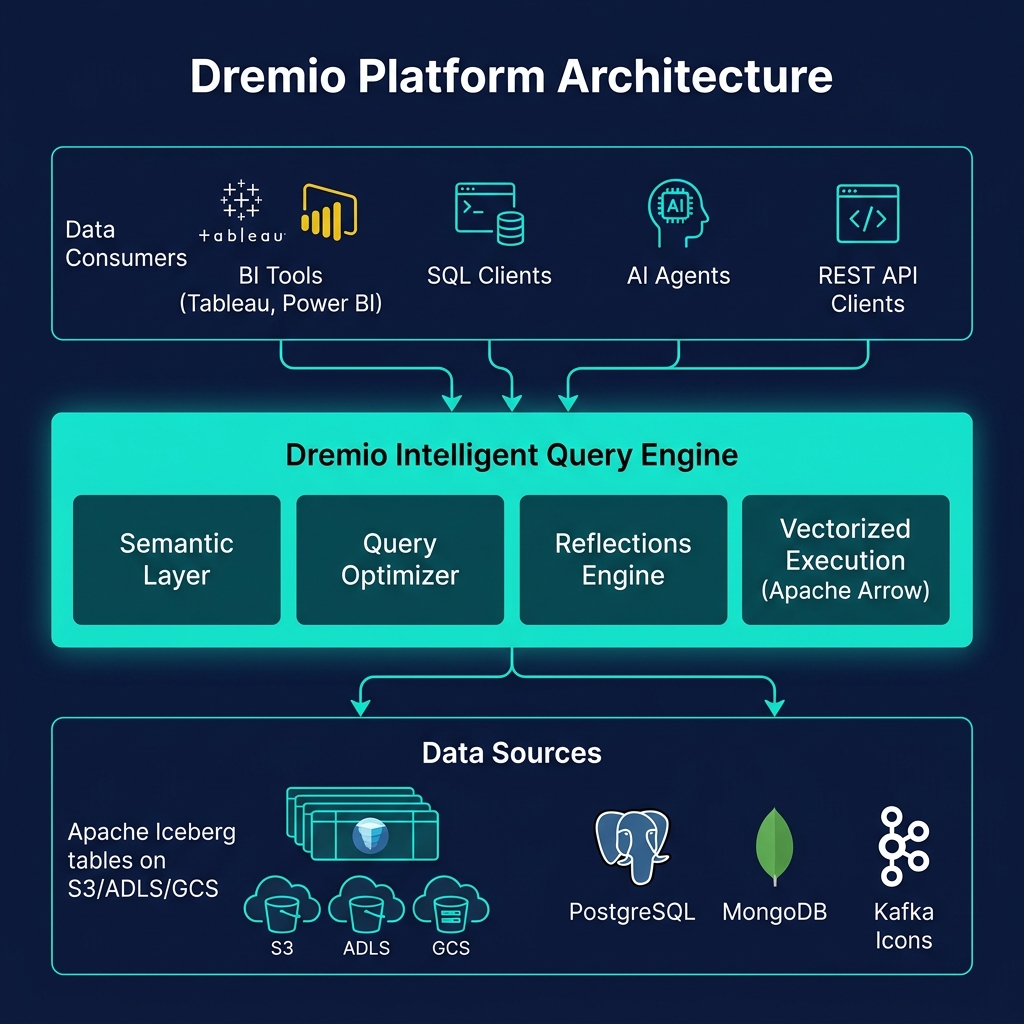
Physical Datasets (PDS) are Dremio's direct registrations of actual data sources in its catalog namespace. A PDS is a pointer to real data — an Apache Iceberg table, a collection of Parquet files in S3, a PostgreSQL table, or any other data source that Dremio supports. Unlike Virtual Datasets, PDS do not transform or compute anything — they simply expose the underlying source as a queryable object in Dremio's catalog, preserving the source's schema exactly.
Physical Datasets are the base layer of Dremio's data architecture. Everything built in Dremio — VDSs, Reflections, semantic definitions — ultimately traces back to one or more Physical Datasets. Understanding PDS is essential for designing a well-organized Dremio catalog hierarchy.
PDS Types and Source Connectivity
Dremio supports Physical Datasets from a wide range of source types:
Iceberg Tables
Tables registered in Dremio's Open Catalog (via the Nessie catalog) or in external Iceberg catalogs (AWS Glue, Apache Polaris). These are Dremio's native, first-class PDS type — full DML, time travel, schema evolution, and Reflections are all supported.
File-Based PDS
Parquet, ORC, JSON, CSV, or Avro files in object storage (S3, ADLS, GCS). Dremio can register entire S3 folders as PDS, inferring the schema from the file contents. File-based PDS support Reflections but not full DML.
Relational Database Tables
Tables from PostgreSQL, MySQL, Oracle, SQL Server, and other JDBC sources. Dremio federates queries to these sources, pushing down predicates for efficiency. VDSs can join relational PDS with Iceberg PDS.
NoSQL and Other Sources
MongoDB collections, Elasticsearch indexes, and other specialized sources. Dremio translates SQL predicates to the native query language of each source.
PDS Schema Inference and Refresh
When a Physical Dataset is first registered in Dremio, Dremio infers its schema by reading the source metadata. For Iceberg tables, the schema is read from the Iceberg table metadata. For Parquet files, Dremio reads the file footers. For JDBC sources, Dremio queries the database's information schema.
For file-based PDS, schema refresh is important: if new files are added to an S3 folder with additional columns, Dremio's schema for that PDS may be stale. Dremio provides manual schema refresh (via the UI or API) and can be configured to automatically refresh schemas on a schedule or when queries detect schema mismatches.
For Iceberg PDS, schema is always current — Dremio reads the current Iceberg table metadata for every query, so schema evolution (new columns, renamed columns) is immediately reflected without any manual refresh.
PDS and the Data Governance Model
Physical Datasets are the access control boundary in Dremio. Access permissions are granted at the PDS level (and can be inherited through the namespace hierarchy). A VDS that queries a restricted PDS will fail for users who don't have access to that PDS — ensuring that VDS abstraction cannot bypass data governance policies.
This makes PDS the correct place to apply: column masking policies (hide PII in the PDS, expose clean data in VDSs), row-level security (filter sensitive rows at the PDS before VDS can aggregate them), and source-level access controls (only specific teams can query certain database PDS sources).
Summary
Physical Datasets are the foundation of Dremio's data architecture — the layer where actual data sources are registered, schemas are defined, and access controls are enforced. Understanding PDS types and the PDS → VDS → Reflection hierarchy is fundamental to designing a scalable, governed data lakehouse catalog in Dremio. Well-organized PDS registrations make the entire semantic layer above them cleaner, more maintainable, and easier for business users to navigate.