What Are Iceberg Manifest Files?
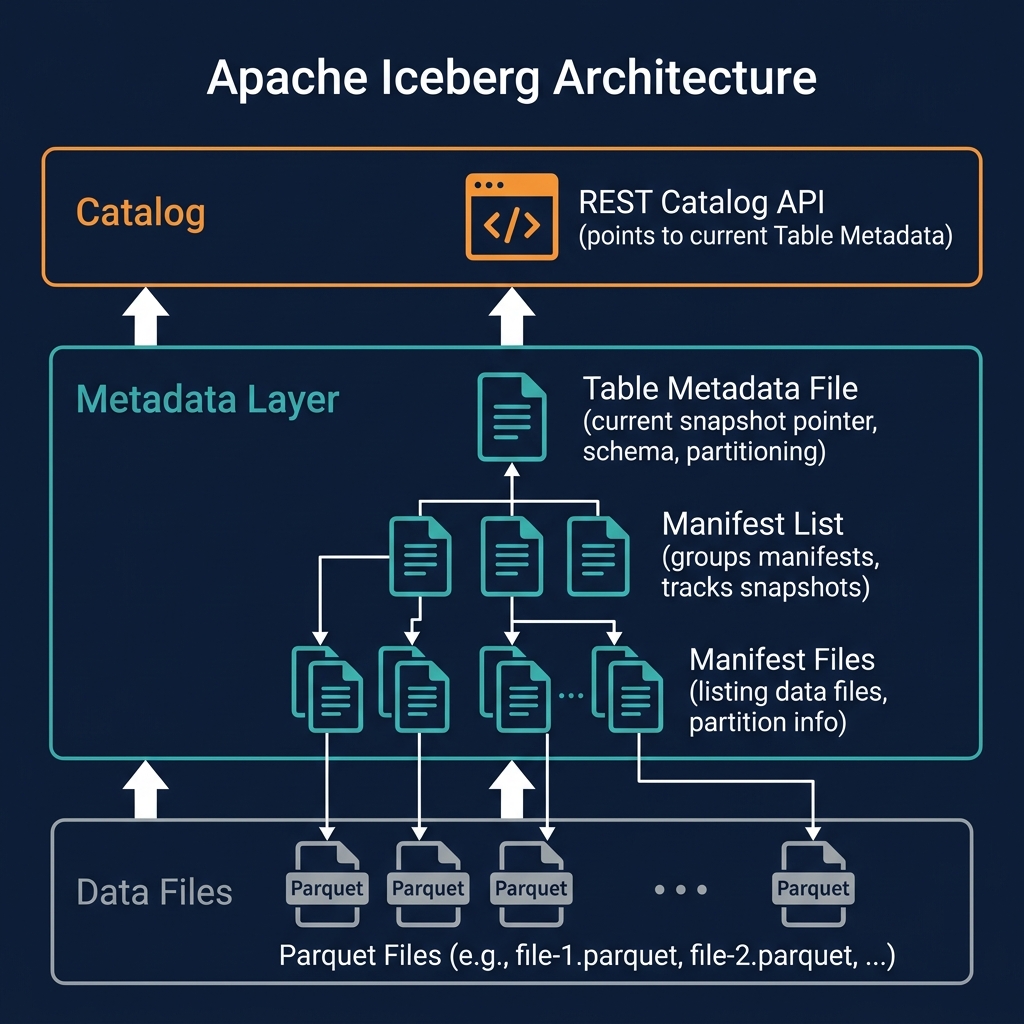
Iceberg manifest files are Avro files that form the middle layer of Apache Iceberg's three-level metadata tree, sitting between the manifest list (snapshot) at the top and the actual data files at the bottom. Each manifest file tracks a subset of the table's data files — listing their storage locations, partition values, and per-column statistics.
Manifest files are the primary mechanism for two of Iceberg's most important query optimization capabilities: partition pruning (skipping entire groups of data files based on partition values) and data skipping (skipping individual data files based on column-level min/max statistics).
At query time, the engine reads the manifest list to get the list of all manifests, then reads the manifests to get the list of data files — but it applies pruning at both levels: first eliminating manifests whose partition summary statistics show no relevant data, then eliminating individual data files within remaining manifests whose per-file statistics show no relevant rows. Only after this two-level pruning does the engine read actual data files.
Manifest File Structure
Each record in a manifest file represents one data file or delete file and contains:
- file_path: The full S3/ADLS/GCS URL of the data file
- file_format: The format of the data file (PARQUET, ORC, AVRO)
- partition: The partition values for this file, encoded according to the table's partition spec
- record_count: The number of rows in the file
- file_size_in_bytes: The file's size in bytes
- column_sizes: Per-column storage sizes (for projection optimization)
- value_counts: Per-column non-null value counts
- null_value_counts: Per-column null value counts
- lower_bounds: Per-column minimum values (encoded in binary format)
- upper_bounds: Per-column maximum values (encoded in binary format)
The lower_bounds and upper_bounds fields — the per-column min/max statistics — are the data that enables aggressive data skipping. A file whose upper_bounds[customer_id] is less than the filter predicate's value can be skipped entirely. A file whose lower_bounds[event_date] is after the query's date range can be skipped. These binary-encoded statistics are evaluated extremely quickly — the engine eliminates irrelevant files without touching their contents.
Manifest Lists vs. Manifest Files
The distinction between manifest lists and manifest files is a frequent source of confusion:
| Attribute | Manifest List | Manifest File |
|---|---|---|
| Also called | Snapshot file | Manifest |
| Format | Avro | Avro |
| Lists | Manifest files (one per entry) | Data/delete files (thousands per file) |
| Statistics | Partition-level summaries across all manifests | Per-file column statistics |
| Created by | Each committed transaction | Each batch of new data files |
| Reused across snapshots? | No (new manifest list per snapshot) | Yes (unchanged manifests reused) |
The manifest list contains partition-level summary statistics for each manifest it references — these are used for the first level of pruning (eliminating entire manifests). The manifest files contain per-file statistics — used for the second level of pruning within a manifest.
How Iceberg Reuses Manifests
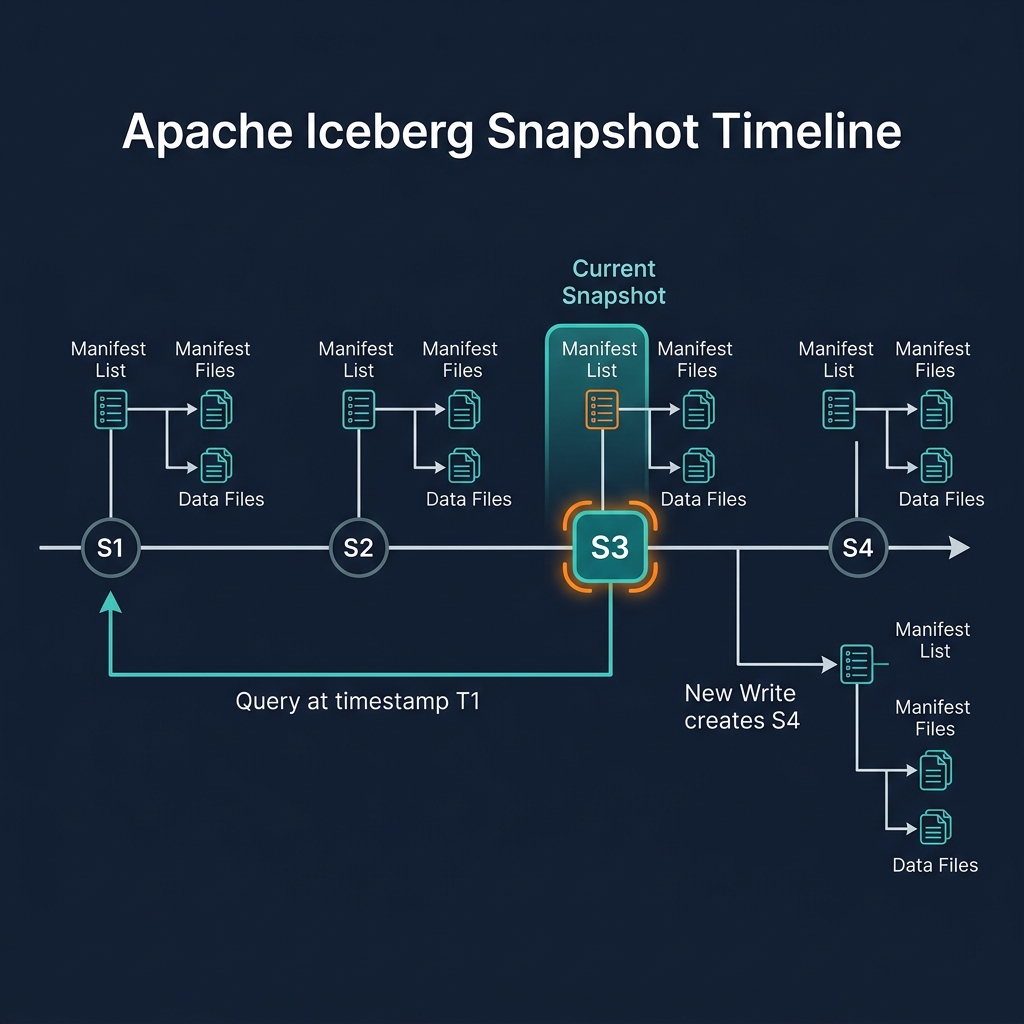
One of Iceberg's most important performance optimizations is manifest reuse: when a transaction adds data to only some partitions, the manifests for unchanged partitions are reused in the new snapshot — not copied or rewritten.
For example: a table with 1000 manifest files covering 1 million data files. A new INSERT adds 100 new files to 5 partitions. Iceberg creates 5 new small manifest files (one per new partition batch) and commits a new snapshot that references those 5 new manifests PLUS the 995 unchanged old manifests. The 995 unchanged manifests are not touched — they are simply referenced by the new snapshot's manifest list.
This reuse property makes Iceberg's snapshot commits fast and cheap even for very large tables: committing a new snapshot requires writing only the new manifests (for the changed partitions) and a new manifest list — not reading or writing all existing manifests.
Manifest File Compaction
Over time, a table accumulates many small manifest files — particularly if data is added in many small batches. Many small manifests slow down query planning (the engine must read each manifest separately) and metadata management.
Iceberg's rewriteManifests operation consolidates small manifest files into fewer, larger manifests while preserving all the file-level statistics. After rewriting, the engine reads fewer manifest files per query, reducing query planning latency. In Dremio, manifest rewriting is part of the automated table optimization — it runs automatically when manifest count exceeds configured thresholds.
Manifest Files and Data Skipping Effectiveness
The effectiveness of manifest file-based data skipping depends on the correlation between the queried columns and the physical data layout. When rows with similar column values are co-located in the same files (via Z-ordering or sort ordering), the per-file min-max statistics are narrow — the engine can skip most files. When rows are randomly distributed across files, min-max statistics span wide ranges, and few files can be skipped.
This is why compaction with sort ordering or Z-ordering is so important: it creates data files with narrow, well-targeted min-max statistics. Manifest files faithfully record these statistics, enabling query engines to leverage the sorted layout for aggressive pruning.
Summary
Iceberg manifest files are the metadata layer that makes petabyte-scale query performance possible in the data lakehouse. By recording per-file column statistics for millions of data files, manifests enable a two-level pruning hierarchy that eliminates the vast majority of storage reads before any data is accessed. Manifest reuse across snapshots makes transaction commits fast; manifest compaction keeps query planning efficient as tables grow. Understanding manifest files is key to understanding why well-maintained Iceberg tables can answer queries in seconds over petabytes of data.