What Is an Iceberg Snapshot?
An Iceberg snapshot is an immutable record of the complete state of an Apache Iceberg table at a specific point in time. Every transaction committed to an Iceberg table — an INSERT, UPDATE, DELETE, MERGE INTO, or table schema change — creates exactly one new snapshot. Each snapshot is identified by a unique 64-bit integer (the snapshot ID) and records the wall-clock timestamp at which it was committed.
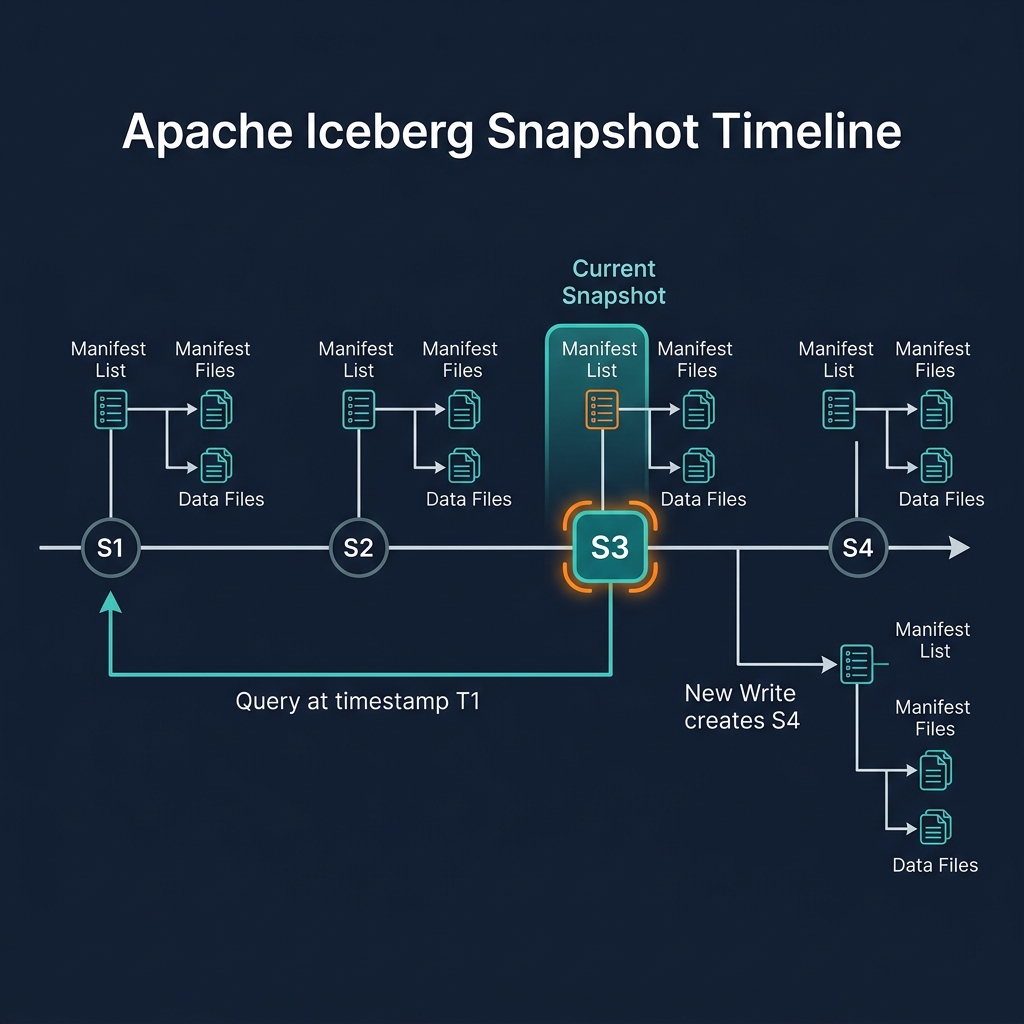
A snapshot is not a copy of the data — it is a pointer to a manifest list that in turn points to all the data files that comprise the table's state at the time of that snapshot. No data is copied when a snapshot is created; existing data files are simply referenced by the new snapshot's metadata chain. This makes snapshot creation extremely fast and cheap, regardless of table size.
Snapshots form a linked list — each snapshot records the snapshot ID of its parent (the previous snapshot). This chain of parent pointers creates the table's transaction history: following the chain from the current snapshot backwards takes you through every transaction ever committed to the table.
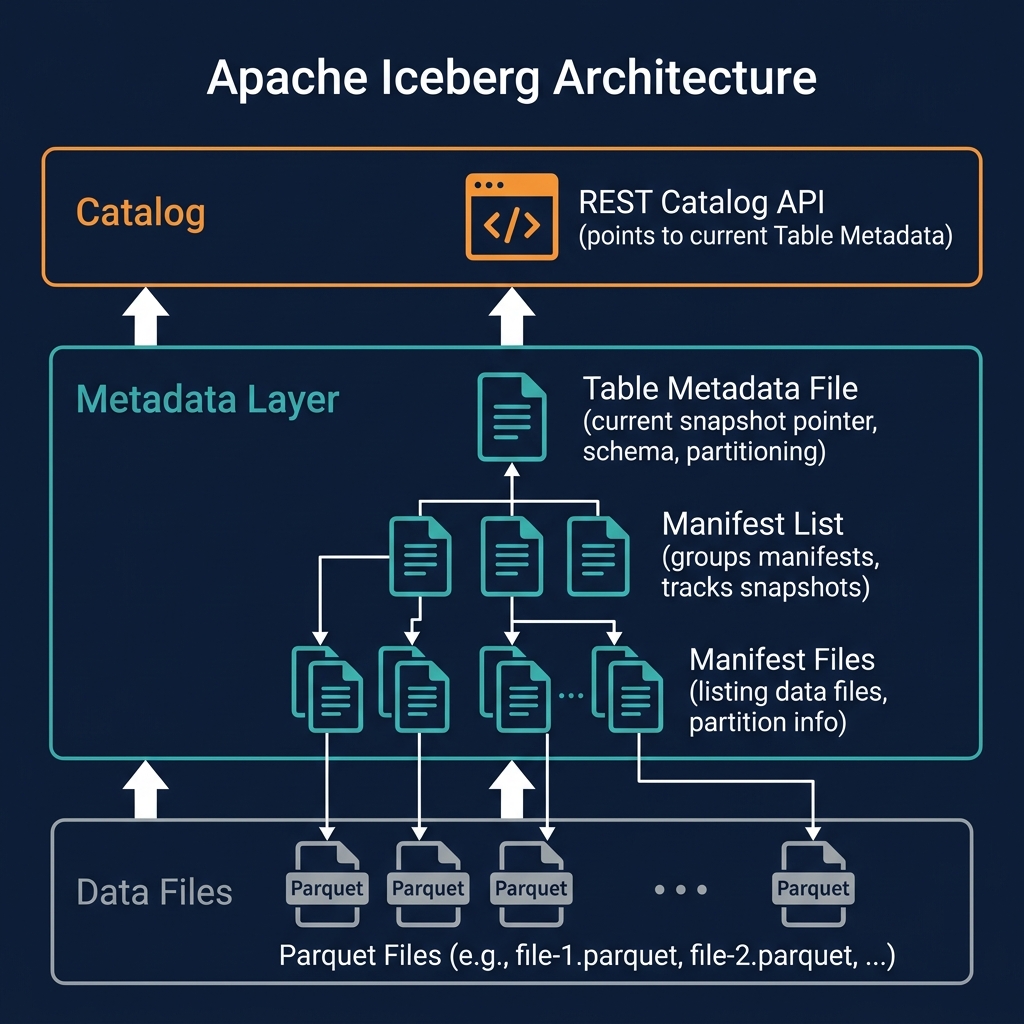
The current snapshot is the snapshot referenced by the table's metadata file. When a query engine asks the catalog for a table, the catalog returns the table metadata file, which contains a pointer to the current snapshot ID. The engine reads that snapshot's manifest list to discover all the current data files.
Understanding snapshots is the key to understanding how ACID transactions, time travel, and multi-engine interoperability work in Apache Iceberg.
Snapshot Anatomy: What a Snapshot Contains
Each Iceberg snapshot is recorded in the table metadata JSON file and contains:
- Snapshot ID: A unique 64-bit integer identifying this snapshot
- Parent snapshot ID: The ID of the previous snapshot (null for the first snapshot)
- Timestamp: The wall-clock time in milliseconds at which this snapshot was committed
- Manifest list location: The path to the Avro manifest list file for this snapshot
- Summary: Key metrics about the snapshot — operation type (append, overwrite, delete), number of added/deleted/existing data files, number of added/deleted/existing rows
- Schema ID: The ID of the schema that was current when this snapshot was committed
The summary field is particularly useful for operational monitoring. By reading the snapshot summaries from the table metadata, a data engineer can quickly see: how many rows were added or deleted by each transaction, what type of operation each snapshot represents, and whether the table is growing or shrinking over time — without reading any data files.
The manifest list location is the entry point to the snapshot's data. Following this pointer gives you the list of all manifest files for this snapshot; following each manifest file gives you the list of data files; reading the data files gives you the actual rows. Every query starts with this chain: catalog → table metadata → snapshot → manifest list → manifests → data files.
How Snapshots Implement ACID Atomicity
Iceberg's snapshot model is the mechanism that implements ACID atomicity. The key insight is that a transaction's visibility is determined entirely by whether its snapshot has been recorded as the current snapshot in the table metadata — a single atomic pointer update.
The write flow for a transaction is:
- The writer reads the current snapshot to understand the current table state
- The writer creates new data files (for inserts) or delete files (for updates/deletes) in object storage
- The writer creates new manifest files referencing the new data/delete files
- The writer creates a new manifest list referencing all manifests (old + new)
- The writer creates a new snapshot record pointing to the new manifest list
- The writer attempts to atomically update the table metadata file to point to the new snapshot
If step 6 succeeds, the transaction is committed — readers will now see the new snapshot's data. If step 6 fails (because another writer committed a snapshot concurrently), the entire write is abandoned and retried. At no point does a partial transaction become visible to readers: either the complete new snapshot is the current one, or the previous snapshot is. This is atomicity.
Files created during a failed transaction (steps 2–5 that were completed before step 6 failed) are orphaned — they exist in storage but are not referenced by any snapshot. Periodic cleanup operations (Iceberg's remove_orphan_files procedure) delete these orphaned files.
Snapshot Isolation for Concurrent Readers
Iceberg's snapshot model provides snapshot isolation for readers — a reader that begins a query operates on a specific snapshot and continues to see exactly that snapshot's data for the duration of the query, regardless of any new transactions committed by writers during the query's execution.
When a query engine begins executing a query against an Iceberg table, it reads the current snapshot ID from the catalog. For the remainder of query execution — which may take seconds, minutes, or hours for complex analytical queries — the engine reads only the manifest lists and data files associated with that snapshot. Even if 100 new transactions are committed during the query's execution, the query is completely unaffected: it continues reading the data files of the snapshot it started with.
This behavior is analogous to the REPEATABLE READ isolation level in SQL databases, but implemented without row-level locking. Iceberg achieves lock-free snapshot isolation because all data is immutable: existing data files are never modified. New transactions write new files and create new snapshots — the old snapshot and its data files remain entirely unchanged and accessible.
For long-running analytical queries in Dremio or Spark — queries that may scan terabytes of data over many minutes — this snapshot isolation guarantee is essential for producing correct results. Without it, a query could see partially updated data from a concurrent writer, producing incorrect aggregations or inconsistent join results.
Time Travel with Iceberg Snapshots
Time travel is the natural consequence of Iceberg's snapshot model. Because every transaction creates a new snapshot rather than overwriting the previous state, all historical snapshots remain in the snapshot log — accessible for querying.
Time travel queries reference historical snapshots in two ways:
By Snapshot ID
SELECT * FROM my_table AT SNAPSHOT '5234567890' — queries the table exactly as it existed in snapshot 5234567890. The engine reads the manifest list for that specific snapshot, resolves its data files, and returns the rows that existed in that snapshot.
By Timestamp
SELECT * FROM my_table AT TIMESTAMP '2026-01-01 00:00:00' — queries the table as it existed at or before the specified timestamp. The engine finds the most recent snapshot committed at or before that timestamp and reads from that snapshot.
Time travel enables powerful operational capabilities: debugging data quality issues by comparing the table before and after a suspected bad write; reproducing exactly the data used to generate a regulatory report on a specific date; recovering from an accidental DELETE by querying the pre-deletion snapshot and re-inserting the deleted rows; and ensuring ML experiment reproducibility by recording the snapshot ID used for training.
In Dremio, time travel is exposed through the AT SNAPSHOT and AT TIMESTAMP syntax, compatible with the standard Iceberg time travel API. Dremio also provides a rollback command that reverts the table's current snapshot pointer to a historical snapshot, effectively undoing all transactions after that point.
Snapshot Retention and Expiration
Iceberg retains all snapshots indefinitely by default — they remain in the table metadata's snapshot log until explicitly expired. For production tables, this requires a deliberate retention policy.
The expireSnapshots operation (available in Spark, Dremio, and the Iceberg REST API) removes snapshots older than a specified timestamp or older than N most recent snapshots, along with their associated manifest files and orphaned data files. After expiration, time travel queries referencing the removed snapshots will fail.
A typical retention policy retains 7–30 days of snapshots. This supports: a reasonable time travel window for debugging and audit queries; GDPR erasure verification (confirming a delete propagated through all snapshots before expiring); and ML experiment reproducibility (retaining snapshots from recent training runs). Expired snapshots' data files that are not referenced by any remaining snapshot are deleted, reclaiming storage.
Dremio's automated table optimization manages snapshot expiration automatically, using configurable retention policies. For Spark-based pipelines, snapshot expiration must be explicitly scheduled as a maintenance job.
Snapshots and Branching in Project Nessie
Project Nessie — Dremio's Git-like catalog — extends Iceberg's linear snapshot model with branching and tagging semantics. In Nessie, a table's snapshot history can diverge into multiple branches, just like Git branches in software development.
A Nessie branch is a named pointer to a specific snapshot of a table. Multiple branches can coexist simultaneously, each pointing to a different snapshot. Writers committing to a branch advance that branch's snapshot pointer. Readers reading from a branch see only the snapshots committed to that branch.
This enables powerful data engineering patterns: creating an experiment branch to test a new transformation without affecting the main branch; maintaining a production branch and a staging branch with different data freshness levels; running a bulk data correction on an isolated branch, validating it, and merging it to main. Nessie's merge operation is analogous to a Git merge — it incorporates all the commits from a source branch into the target branch atomically.
Snapshot Performance Considerations
The snapshot metadata chain — table metadata → manifest list → manifest files — is read for every query. As tables grow to millions of data files and thousands of snapshots, this metadata read path can become a performance bottleneck if not properly maintained.
Manifest File Accumulation
Each transaction adds new manifest files to the snapshot. For tables with very frequent small transactions, the manifest list can grow to reference thousands of manifest files, making metadata reads slow. Iceberg's rewriteManifests operation consolidates many small manifest files into fewer larger ones, reducing metadata read overhead. Dremio's automated optimization manages this transparently.
Table Metadata File Growth
The table metadata JSON file accumulates all snapshot records. After thousands of transactions, this file can grow large. Iceberg's expireSnapshots removes old snapshot entries from the metadata file, keeping it manageable.
Catalog Lookup Caching
Query engines cache the current snapshot metadata for frequently accessed tables, reducing catalog roundtrips. Dremio caches table metadata and invalidates the cache when a new snapshot is committed, ensuring queries see fresh data while avoiding redundant catalog reads for stable tables.
Summary
Iceberg snapshots are the fundamental unit of consistency in the data lakehouse. Every committed transaction creates a new snapshot — an immutable, complete description of the table's state — that enables ACID atomicity (visibility is binary: either the snapshot is current or it isn't), time travel (all historical snapshots are queryable), and snapshot isolation for concurrent readers (readers are unaffected by new writer commits).
The snapshot model's elegance is that it achieves all these guarantees without distributed locking or write-ahead logging — capabilities that are difficult or impossible to implement efficiently on cloud object storage. By making data immutable and using atomic pointer swaps to commit transactions, Iceberg delivers database-grade consistency semantics on infrastructure designed for simple file storage.
For practitioners working with Dremio, Spark, or Trino on Apache Iceberg tables, understanding the snapshot model explains why concurrent reads are always consistent, why time travel is instantaneous, and why failed writes leave no partial state behind — the properties that make the modern data lakehouse reliable enough for production analytical workloads.