What Is Partition Evolution?
Partition evolution is Apache Iceberg's ability to change a table's partitioning scheme over time — without rewriting any of the existing data files. When a partition spec is changed in Iceberg, old data files retain the partition layout under which they were written, and new data files use the new partition layout. The Iceberg query planner correctly handles both old and new file groups simultaneously, pruning files based on the appropriate partition spec for each.
This capability solves one of the most painful problems in traditional Hive-partitioned data lakes: partition schemes chosen at table creation time often become suboptimal as data volumes, query patterns, or time granularities change — and changing them requires expensive full-table rewrites that can take days for large tables.
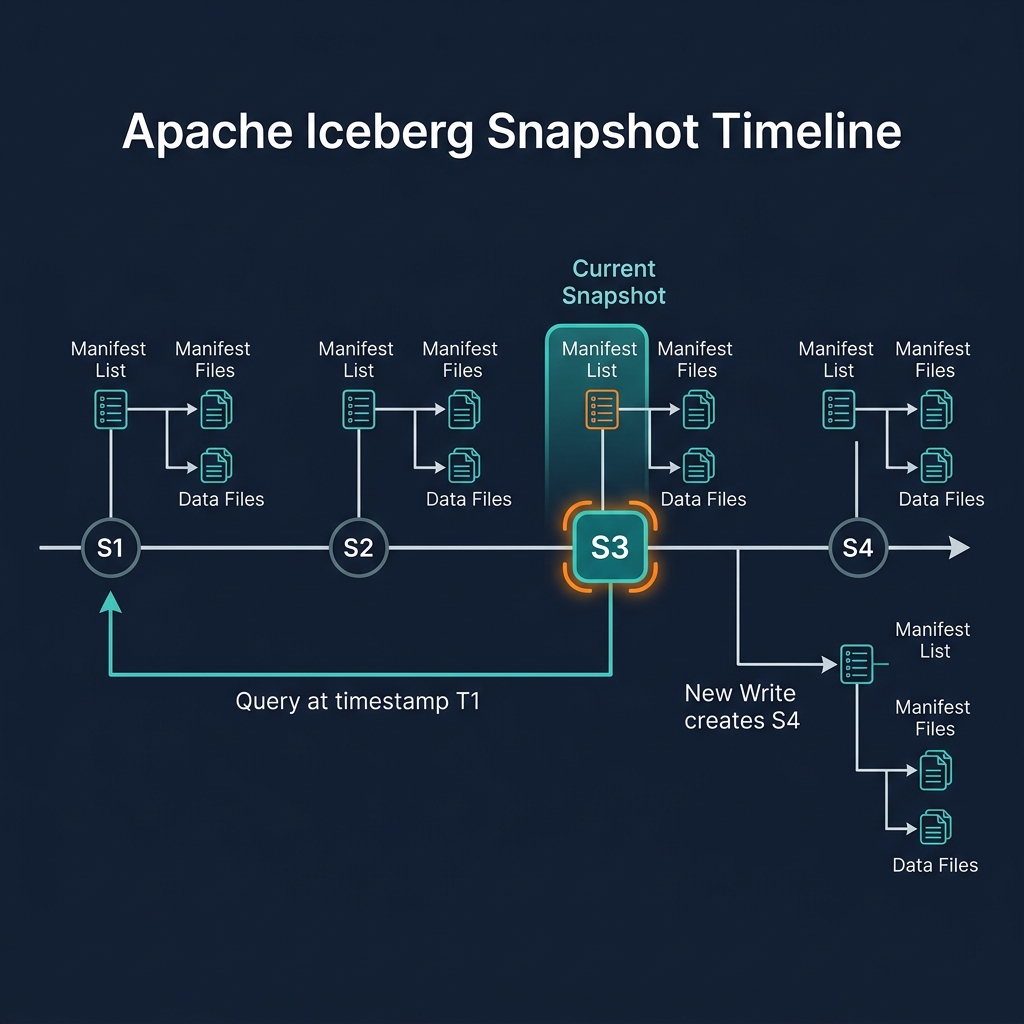
With Iceberg, a table that was initially partitioned by day (days(event_time)) can be re-partitioned to hours (hours(event_time)) with a simple metadata operation. All existing daily-partitioned files remain unchanged; new files are written to hourly partitions. Queries that filter by hour see hourly pruning for new data and daily pruning for old data — both working correctly without any configuration from the query writer.
How Partition Evolution Works
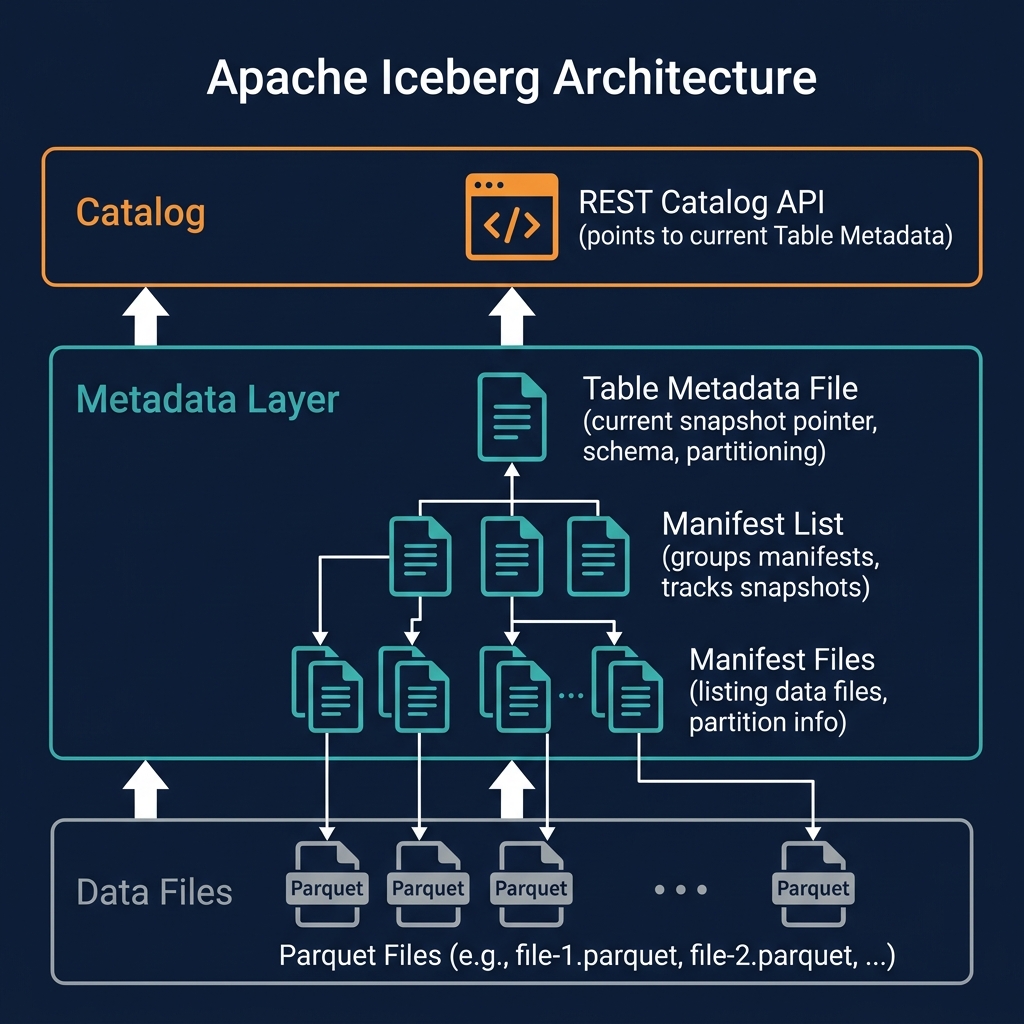
Iceberg's partition evolution is possible because each data file in the table records the partition spec ID under which it was written. The table's metadata records the history of all partition specs ever applied to the table, each identified by a unique integer ID.
When a query engine plans a query against an Iceberg table with multiple active partition specs, it reads the manifest files for each data file group, identifies the partition spec ID for each group, and applies the correct partition pruning logic for each group independently. This per-file-group partition evaluation is the technical mechanism that makes mixed-spec tables correct and efficient.
Partition evolution is triggered by the ALTER TABLE tbl REPLACE PARTITION FIELD statement (or its engine-specific equivalent). After execution, new writes to the table use the new partition spec, and the table metadata records the new spec alongside the old ones.
Iceberg Partition Transforms
Iceberg applies partition transforms to column values to derive partition values. These transforms are what enable hidden partitioning:
- identity(col): Partition by the exact column value — equivalent to Hive partitioning. Efficient for low-cardinality columns like status, region.
- days(col), hours(col), months(col), years(col): Extract the time component from a timestamp column. The most common transform for time-series data.
- bucket(N, col): Hash the column value and assign to one of N buckets. Used for high-cardinality columns like user_id to distribute data evenly and enable efficient joins.
- truncate(W, col): Truncate a string or integer column to W characters/digits for partitioning. Used for prefix partitioning of string columns.
When partition evolution changes a time-series table from days(event_time) to hours(event_time), the transform function changes but the source column (event_time) remains the same. Old files' days(event_time) partition values are still valid for day-level pruning; new files' hours(event_time) partition values enable hour-level pruning.
Partition Evolution and Hidden Partitioning
Partition evolution is deeply connected to hidden partitioning — the Iceberg feature where partitioning is transparent to query writers. Because partition transforms are applied by Iceberg's metadata layer (not exposed to the user as separate partition columns), users write queries against the original data columns (WHERE event_time > '2026-01-01') and benefit from partition pruning automatically.
When partition evolution changes the partitioning transform, this transparency is maintained: users' queries do not change, and the query planner automatically applies the appropriate pruning for each file group based on its partition spec. The evolution is entirely transparent to query writers.
This is in contrast to Hive-style partitioned tables, where partition columns are explicitly visible in queries (WHERE partition_date = '2026-01-01') and users must know and use the partition column names to get pruning benefits. With Hive, changing a partition column requires query changes from all downstream consumers.
When to Use Partition Evolution
Common scenarios that trigger partition evolution:
- Growing data volume: A table partitioned by month becomes too large per partition as data grows, causing slow scans within partitions. Evolving to weekly or daily partitions improves within-partition scan performance without rewriting historical data.
- Changing query patterns: A table originally queried by month now has significant hourly dashboard use cases. Evolving from monthly to hourly partitioning enables faster hourly queries without sacrificing the historical monthly data layout.
- Correcting poor initial choices: A new table was partitioned by a high-cardinality column (user_id), producing millions of tiny partitions. Evolving to a bucketed partition scheme (bucket(1024, user_id)) reduces partition count while maintaining data locality for user-level queries.
- Data source migration: A table that ingested data partitioned by ingestion date evolves to partition by event date after the data pipeline is updated to provide event timestamps reliably.
Partition Evolution in Dremio
Dremio supports reading Iceberg tables with multiple active partition specs transparently — queries against mixed-spec tables work correctly without any user awareness of the partition spec history. Dremio's query planner reads the partition spec for each manifest file group and applies the appropriate pruning logic independently.
Partition evolution DDL in Dremio follows Iceberg's SQL extension: ALTER TABLE tbl ADD PARTITION FIELD hours(event_time) adds a new partition field (for additive evolution) and ALTER TABLE tbl REPLACE PARTITION FIELD days(event_time) WITH hours(event_time) replaces an existing transform. After evolution, new data written by any engine connected to the same catalog uses the new partition spec.
Mixed-Spec Table Performance Considerations
While partition evolution is correct and functional for mixed-spec tables, there are performance considerations for tables with a very long evolution history:
Files written under old partition specs cannot benefit from pruning by the new spec's finer granularity. For example, if old files are in daily partitions and new files are in hourly partitions, a query for a specific hour will prune all daily files to the relevant day (coarse) and all hourly files to the specific hour (fine). If most data is in old daily files, the hourly pruning benefit is limited.
For tables where the entire dataset should benefit from the new partitioning, a background rewrite (INSERT OVERWRITE or Dremio's compaction with clustering) can rewrite old files under the new partition spec. This is a significant operation for large tables but provides full partition pruning benefits across all data. Iceberg's partition evolution allows this to happen incrementally — the table remains fully queryable during the rewrite.
Partition Evolution Best Practices
Follow these practices to use partition evolution effectively:
- Choose initial partition specs thoughtfully. Partition evolution is powerful, but the best schema is one that requires minimal evolution. Design initial partitioning around the most common query filter patterns and expected data volumes.
- Monitor partition sizes after evolution. After evolving to a finer partition granularity, verify that new partitions are appropriately sized (not too small — the small file problem — and not too large — poor within-partition scan performance). The target partition size for most workloads is 512MB–2GB of compressed Parquet data.
- Avoid frequent evolution. Each partition evolution adds a new spec to the table's history. A table with 10 different partition specs over its lifetime is harder to reason about and may have complex query planning behavior. Plan partition schemes to last at least 12–24 months before evolving.
- Document evolution rationale. Record why each partition evolution was made, including the previous and new partition specs, the data volume at the time of evolution, and the query pattern that drove the change.
Summary
Partition evolution is one of Apache Iceberg's most practically impactful features for long-lived production tables. By decoupling the partition spec from the data files and tracking each file's spec independently, Iceberg allows partition schemes to evolve freely as data volumes grow and query patterns change — without the costly full-table rewrites that Hive-partitioned systems require.
Combined with schema evolution and hidden partitioning, partition evolution gives data engineers the flexibility to continuously optimize their lakehouse tables for current query patterns without disrupting existing users or requiring migrations. It is a core capability that makes Apache Iceberg the right foundation for tables expected to live and evolve over years of production use.