What Is Time Travel?
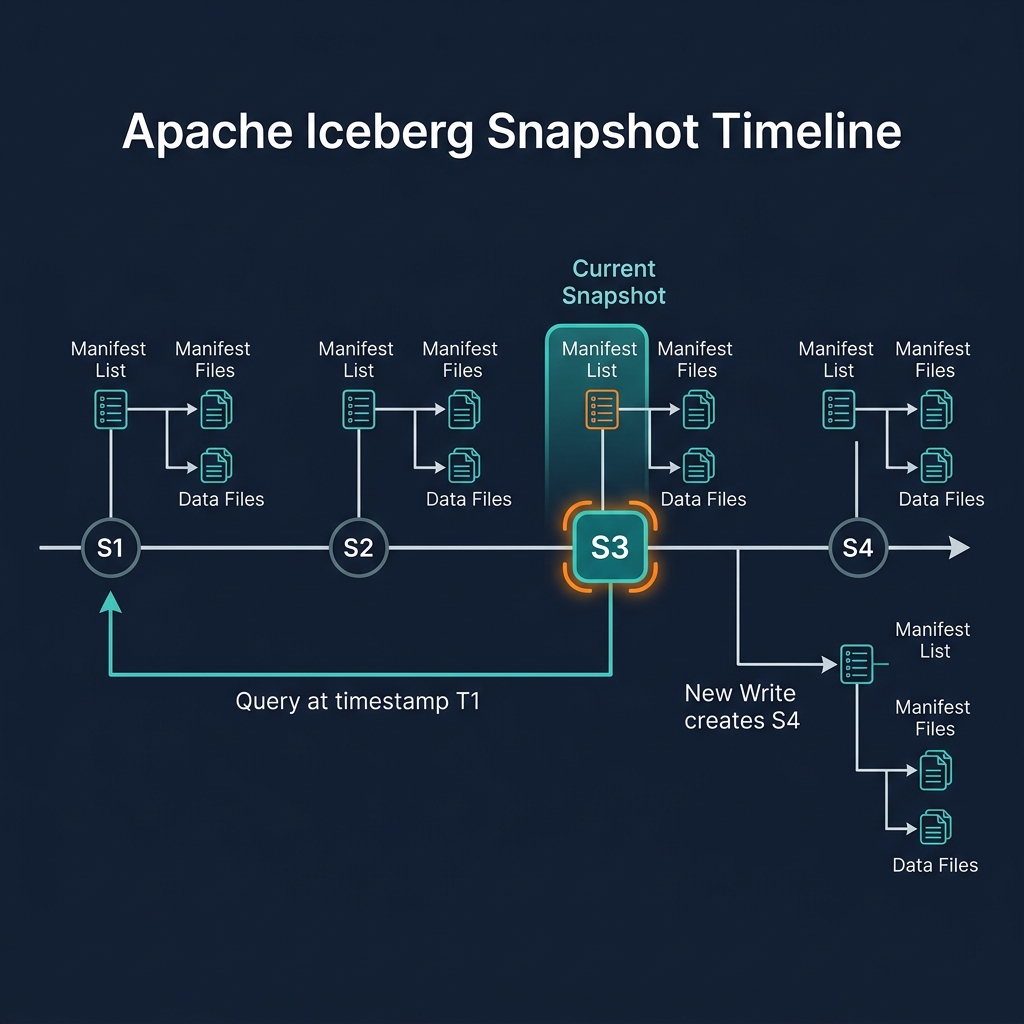
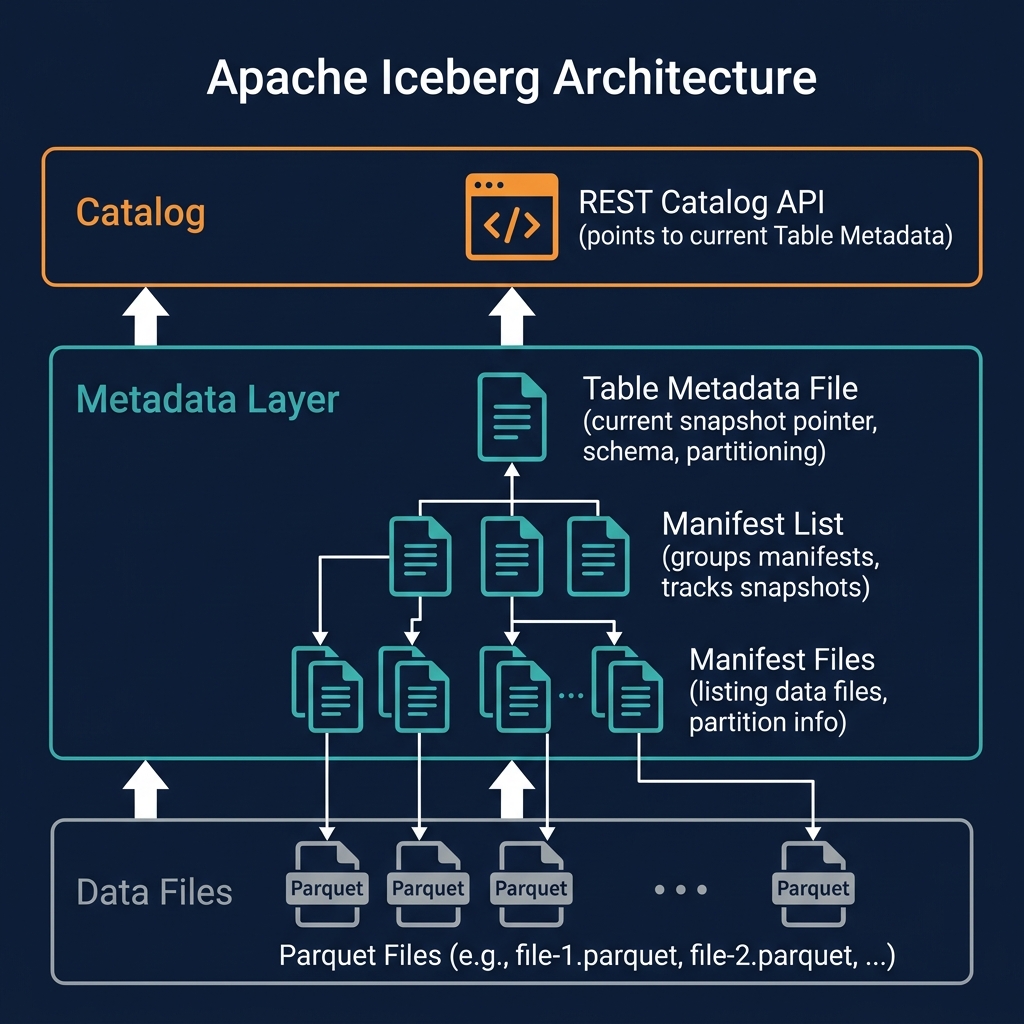
Time travel is the capability to query a table as it existed at a specific point in the past — returning exactly the rows, columns, and values that were present at that historical moment. Apache Iceberg provides time travel natively through its snapshot model: because every transaction creates a new immutable snapshot rather than overwriting the previous state, all historical snapshots remain accessible for querying.
Time travel is not a special-purpose feature built on top of Iceberg — it is a natural consequence of the snapshot architecture. The history exists because every write is atomic and non-destructive. Enabling time travel requires no additional configuration or storage beyond the standard Iceberg snapshot retention.
Compare this to traditional databases and data warehouses, where point-in-time recovery requires either continuous backup snapshots (expensive), log shipping (complex), or a separate audit table (application-level, fragile). In Iceberg, the historical record is built into the table format itself — no additional infrastructure required.
Time Travel Query Syntax
Apache Iceberg defines two time travel query mechanisms, both supported natively in Dremio, Apache Spark, and Trino:
By Snapshot ID
SELECT * FROM my_table AT SNAPSHOT '5234567890123456' — queries the table exactly as it existed in the specified snapshot. The snapshot ID is a 64-bit integer assigned at commit time. Snapshot IDs can be found in the table's history: SELECT * FROM my_table$history (Spark syntax) or via the catalog's metadata API.
By Timestamp
SELECT * FROM my_table AT TIMESTAMP '2026-01-01 00:00:00' — queries the table as it existed at or before the specified timestamp. Iceberg selects the most recent snapshot committed at or before the specified time. This is the most commonly used form because timestamps are human-readable and don't require knowing specific snapshot IDs.
Rollback
Beyond querying, Iceberg also supports rollback — reverting the table's current snapshot to a historical one, effectively undoing all transactions after that point. In Dremio: ALTER TABLE my_table ROLLBACK TO SNAPSHOT '5234567890'. This is useful for recovering from an accidental DELETE or incorrect batch load.
Time Travel Use Cases
Time travel enables a wide range of operational and analytical use cases:
Data Quality Debugging
When analysts report incorrect dashboard values after a pipeline run, time travel allows engineers to compare the table before and after the run: SELECT count(*) FROM orders AT TIMESTAMP 'before_pipeline' vs SELECT count(*) FROM orders AT TIMESTAMP 'after_pipeline'. This pinpoints exactly which records were added, changed, or deleted by the pipeline.
Regulatory Audit
Financial and healthcare regulations require the ability to reproduce exactly what data was used to generate a report on a specific date. With Iceberg time travel, a compliance engineer can query SELECT * FROM customer_data AT TIMESTAMP '2026-03-31 23:59:59' to see exactly what the customer table contained at quarter-end — without maintaining a separate audit copy.
ML Experiment Reproducibility
Recording the snapshot ID used for ML model training ensures that future retraining runs use exactly the same dataset. SELECT * FROM features AT SNAPSHOT '...' returns an identical dataset regardless of when it is run — essential for reproducible ML experiments.
Accidental Delete Recovery
If a DELETE statement removes important records accidentally, recovery is straightforward: query the pre-deletion snapshot to identify the deleted rows, then INSERT them back into the current table. INSERT INTO my_table SELECT * FROM my_table AT TIMESTAMP 'before_delete' WHERE id IN (deleted_ids).
Time Travel and Snapshot Retention
Time travel is only available for snapshots that have not been expired. The snapshot retention policy determines how far back time travel can go. Most production deployments configure a retention window of 7–30 days.
Iceberg's expireSnapshots operation removes snapshots older than a specified timestamp or older than N most recent snapshots, along with their associated orphaned data files. After expiration, querying the removed snapshots returns an error.
When setting retention policies, consider: how far back users need time travel (typically 7 days covers most debugging needs), how far back regulatory auditors may need to query (may require 90 days or longer), and storage cost (each historical snapshot retains any data files that are not referenced by current snapshots — old deleted data accumulates storage cost until expiry). Dremio's automated table optimization manages snapshot expiration based on configured retention policies.
Time Travel and the Medallion Architecture
Time travel is valuable at every layer of the Medallion Architecture:
- Bronze: Query raw ingested data as of a specific date to debug source system changes. Reproduce the exact raw data used in a historical pipeline run.
- Silver: Compare the Silver table before and after a pipeline logic change to validate the new transformation. Recover individual records deleted during GDPR processing by querying a pre-deletion Silver snapshot.
- Gold: Reproduce the exact Gold data used for a quarterly report. Debug why a KPI changed by querying Gold as of two different dates and comparing the result.
Time Travel with Project Nessie Branches
Project Nessie extends Iceberg's linear time travel model with branching semantics. In Nessie, each branch has its own independent snapshot history. Time travel within a Nessie branch queries historical snapshots on that branch specifically, not the main production branch.
This enables powerful data engineering workflows: creating an experiment branch, running a transformation, querying the experiment branch's history to validate results, and then merging to main if the results are correct. The experiment's history (and its time travel capability) is preserved on the branch indefinitely.
Summary
Time travel is one of Apache Iceberg's most valuable operational features. As a natural consequence of the snapshot architecture, it provides the ability to query any historical table state — without separate data copies, backup infrastructure, or application-level audit tables. This capability transforms data debugging from a guessing game into a precise, reproducible operation, and makes regulatory compliance straightforward.
Dremio's AT SNAPSHOT and AT TIMESTAMP SQL syntax makes time travel accessible to every analyst and data engineer — no Spark expertise required. Combined with Dremio's automated snapshot retention management, time travel in the data lakehouse is both powerful and operationally simple.